We may earn a commission from links on this page.
TechA $30 Expansion Card Reportedly Hid Three Samsung 2TB SSDs

The reported flea-market find contained three Samsung 980 Pro drives. Asus's adapter specifications explain why motherboard support matters before all 6TB can be used.
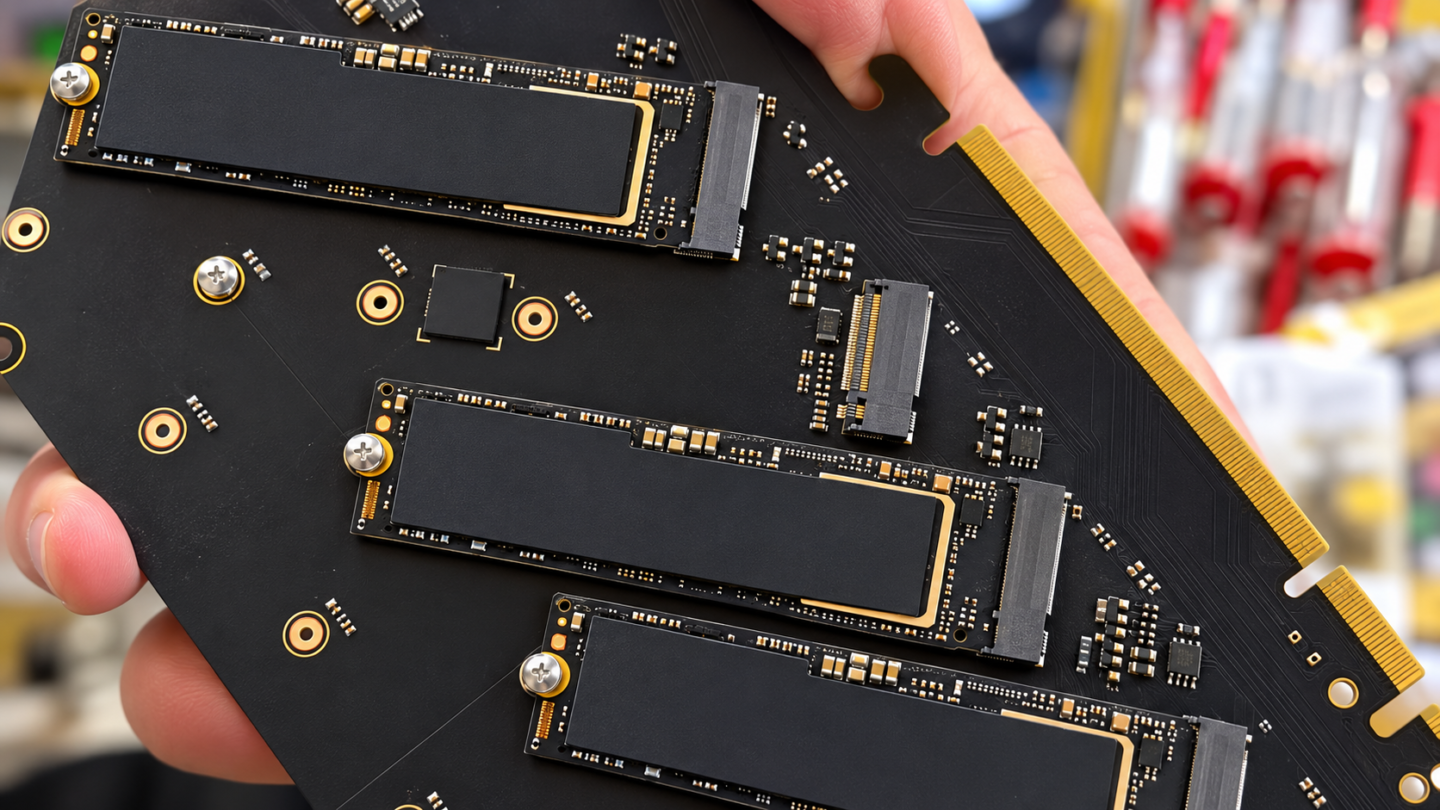
Six terabytes of nominal storage were reportedly hidden beneath the heatsink of a $30 expansion card. The find contained three separate Samsung SSDs, making the motherboard’s ability to connect them as important as the surprise purchase price.
Tom’s Hardware attributes the discovery to Sunny, @whateversunnyfinds, who reportedly bought an Asus adapter containing three Samsung 980 Pro 2TB drives.
The hardware was an Asus Hyper M.2 x16 Gen 4 card. The surprise is easy to understand: a large heatsink can make a populated storage adapter look much like an empty one from the outside.
Three drives under one heatsink
Three drives advertised at 2TB each add up to 6TB of nominal capacity. They remain three separate devices unless configured into a combined storage arrangement. The adapter is a way to connect drives, not evidence that the buyer found a single 6TB SSD.
Asus lists four PCIe M.2 slots on the card and says the supported drive count depends on CPU specifications and motherboard PCIe bifurcation settings.
Detection, health and usable capacity
| Storage Check | What to Confirm |
|---|---|
| Detection | The exact motherboard, CPU, slot, and supported bifurcation arrangement. |
| Health | Individual-drive status and testing through a supported connection. |
| Capacity | Three 2TB labels total 6TB nominal, about 5.46TiB before overhead. |
The motherboard determines supported drive count
PCIe bifurcation divides a slot’s lanes among devices. For this sort of adapter, the relevant question is how the particular motherboard routes and divides those lanes, not simply whether the long card fits into a slot.
Check the board’s manual and Asus’s linked compatibility guidance for the exact CPU and slot combination. A system that recognizes fewer drives than expected may be limited by that configuration rather than by an empty socket on the adapter.
ASUS specifies PCIe M.2 storage devices only, with four Key M sockets supporting the listed lengths. An M.2 shape alone is not enough to establish compatibility with this adapter. The exact drive interface and the motherboard’s lane arrangement both need to match the intended setup.
The capacity headline has a second unit distinction. Three nominal 2TB drives represent 6 trillion bytes, approximately 5.46 tebibytes before formatting or other overhead. NIST’s binary-prefix definitions explain the TB/TiB distinction. A smaller binary-unit display does not, by itself, mean a missing drive.
Checking the drives after detection
For a working Samsung drive, Samsung’s Magician software provides supported drive-management and health information. Its available functions vary by drive and connection, so detection through an adapter should be checked rather than assumed.
Only then does a price comparison become meaningful. Completed second-hand sales for comparable, tested hardware are more informative than the highest asking price for a new unit. Any missing warranty or required adapter work belongs in that comparison too.